
Monday, March 23, 2020

AWS Systems Manager - Apply Chef Recipes


AWS Systems Manager eases the operations and maintenance of automation(s) of common administrative and security tasks from one single window which is AWS Systems Manger Console via 'Run Command'. We can perform lot of tasks like applying IAM role to EC2 instances, Attach EBS Volumes, Run Ansible Playbooks at target nodes without having to have access to keys of those instances
Now, AWS has come up with yet another feature which was most awaited, i.e., to run Chef Recipes in AWS Instances irrespective Windows or Linux OS
Pre-requisites:
- AWS Console login credentials
- Console or Program access to S3, AWS Systems Manager - Run Command
Getting Started:
- Login to AWS Console
- prepare Chef recipes that would run from Chef version 11
- Place the Chef Cookbooks in Github or in S3 bucket
- Open AWS Systems Manager Console
- Click on 'Run Command' under 'Actions and Change' menu section
- Click on 'Run Command' at right corner
- Find the option 'AWS-ApplyChefRecipes' and click on the same

- Now configure your 'Source Type' either S3 or Github, wherever the Chef cookbooks are stored

- Define the S3 path of code location in 'Source Info'

- Define list of 'cookbooks' to run in 'Runlist' box

- Pass any JSON attributes if required for the cookbook in 'JSON Attribute' box

- select 'Chef Version' according to your code compatibility; supports since Chef 11

- specify target instances to run these 'Chef Recipes' by 'Tags' or 'Select Manually' or by 'Resource Group'
- Define 'S3 output' logging location, if required
- Lastly, define SNS notifications, if required and finally click on 'Run' in order to execute the Chef Recipes in target nodes selected
Enjoy cooking Chef Recipes in AWS Systems Manager !!
Saturday, March 21, 2020
HowTo Upgrade to AWSCLI Version 2

While launching instance in EC2, instances come with default AWSCLI verison 1.xx.xx installed. If we have to use the latest features in line with what AWS releases across services, aspected with AWSCLI, we will have to upgrade the CLI version to 2.x
Let us see how to do this in EC2 instances
Pre-requisites:
- AWS Login access & credentials
- Permissions and/or Access policies to upgrade utilities/tools in EC2
- Log in to the AWS Console
- Launch an EC2 under free-tier or log in/ssh into your EC2 via putty or other modes of connection allowed to you
- run 'sudo yum update -y', if required
- check the currently available awscli version

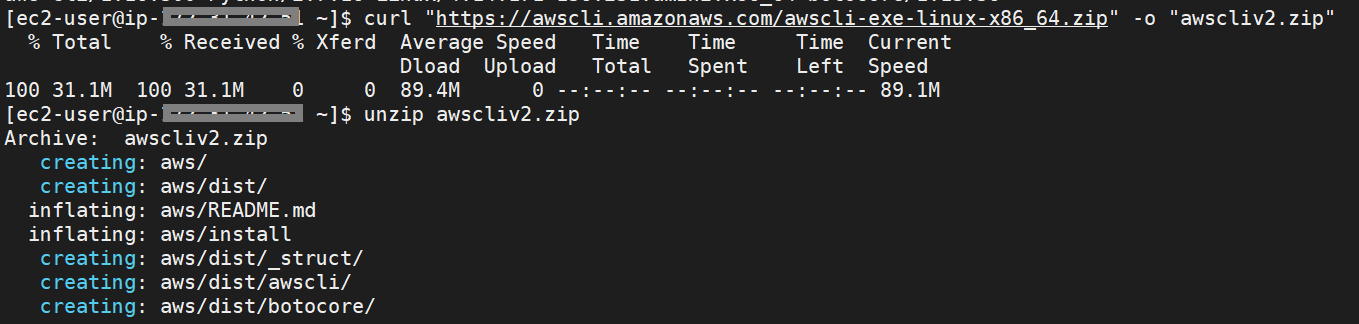
- download and unzip the awscli bundle from aws location
- run sudo install

- check for the new version updated by looking at the default location where awscli is installed & symlink created(at /usr/local/bin/)

- Now restart or start a new session in the EC2 and check for the version of awscli

Friday, March 20, 2020

Thursday, March 19, 2020

Subscribe to:
Posts (Atom)