
Showing posts with label Amazon Redshift. Show all posts
Showing posts with label Amazon Redshift. Show all posts
Friday, March 20, 2020

Thursday, March 19, 2020


Wednesday, March 18, 2020
Amazon Redshift Cluster - Pause and Resume - Series 6

- 'Pause on Schedule' or 'Resume on Schedule' is an option where in we can define 'Pause' & 'Resume' based on a cron schedule. For example, I can set for 'Pause' on end of day Friday or Weekend and set for 'Resume' by early Monday Morning or Beginning of the the week, as per the operational needs


- This comes handy, when we have non-prodcution clusters which can be set to 'Pause' state until it is needed later

- Quick catch is that, when we define 'Pause on Schedule' and if you have selected a 'Resume' window as well, then there are two different schedules that are created to handle the 'Pause' and 'Resume' each separately

Tuesday, March 17, 2020
Sunday, March 15, 2020
Saturday, March 14, 2020
Amazon Redshift Cluster - Pause and Resume - Series 2

Let us create a Amazon Redshift Cluster and setup 'Pause & Resume'
- Log in to the AWS console using your AWS account credentials
- Go to the Amazon Redshift Console and create a cluster
- Select the type/nodes of the cluster to be created, as per the requirements. As this is for demonstration, I have selected 'dc2.large' type with 1 Node for obvious reasons
 | |
| Amazon Redshift - Select a Cluster as per the needs |
4.Now click on configure the cluster by specifying Cluster Name, Master User name, password

5.Watch the cluster being provisioned

6.Now available
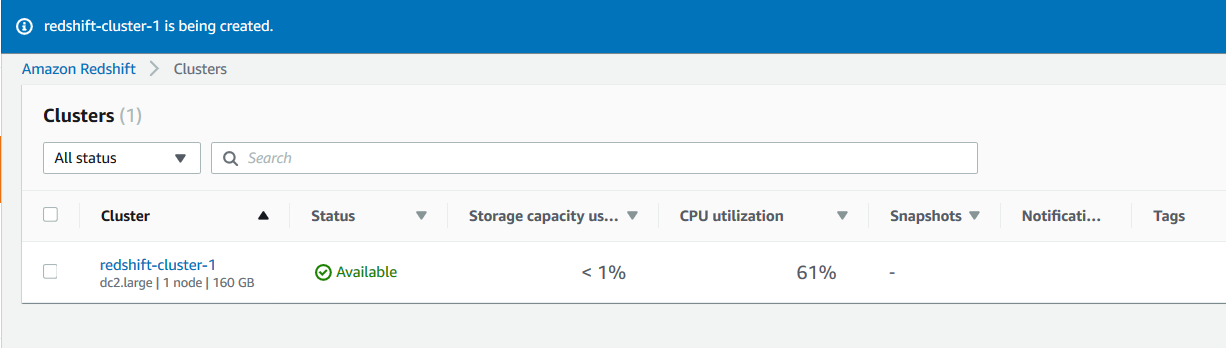
Thus we created a Amazon Redshift Cluster Successfully
Thursday, March 12, 2020

Saturday, November 10, 2018
Amazon Redshift - How to fix commands ignored error
Amazon Redshift - How to fix commands ignored error

Friday, November 9, 2018
Wednesday, November 7, 2018

Subscribe to:
Posts (Atom)